
Must-Have Photography Gear: Essential Kit Every Photographer Needs
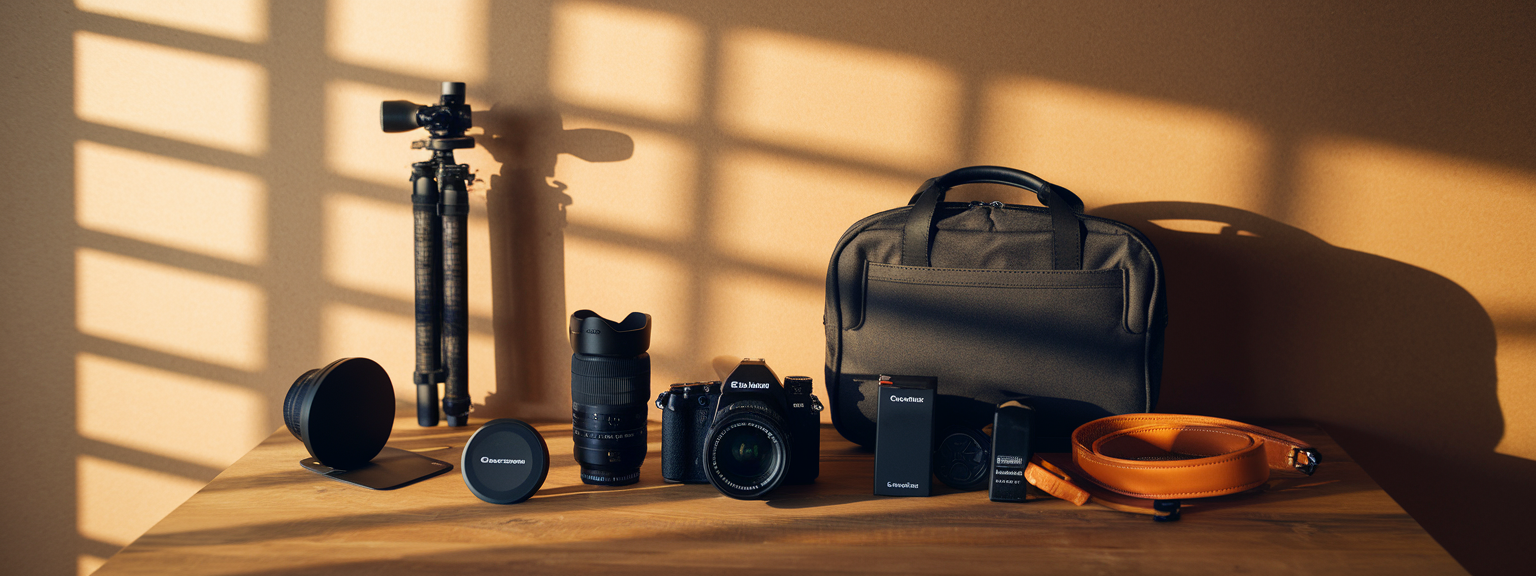
📝 Step-by-Step Guide: Must-Have Photography Gear
Introduction
Must-Have Photography Gear is the foundation of every successful shoot, whether you work professionally or are building an essential camera gear kit as a hobbyist. In the first 100 words this guide explains what to prioritize. For example, choose reliable camera bodies and lenses first, then add camera accessories such as memory cards, a tripod, and lighting equipment. This approach reduces downtime and improves results immediately.
Step 1 — Define the shoot and select gear
Begin by identifying the genre of photography you will shoot. For instance, portrait work needs different lenses and lighting than landscape photography. Create a checklist that includes core items of photography equipment and camera accessories. This ensures you bring the right must-have photography gear for the job.
- Portrait: 50mm or 85mm prime, 24–70mm zoom, off-camera flash, reflectors.
- Landscape: Wide-angle lens (16–35mm), tripod, ND and polarizer filters.
- Wedding: Two bodies, 24–70mm and 70–200mm, fast primes, spare batteries and cards.
- Product: Macro or 50mm, strobes or continuous lights, tripod, tethering cable.
Step 2 — Inspect and prepare gear
Before you leave, inspect every item. Charge batteries to 100% and pack spares. Format memory cards in-camera rather than on a computer to avoid compatibility issues. Clean lens elements, check for dust or fungus, and test flash triggers. Make a packing diagram to speed access to your essential camera gear when on location.
Step 3 — Set up at the location
Once on site, establish composition first and then set exposure. Mount the camera on a tripod and verify the quick-release plate is locked. Use a bubble level or the camera’s electronic grid for straight horizons. If using off-camera lighting, set power ratios and confirm sync with test frames.
Step 4 — Shoot methodically
Work in a methodical order to reduce mistakes. For events, use two bodies or two camera systems with different lenses mounted. For portraits, start wide then move tighter. For landscapes, bracket exposures and use ND filters to control dynamic range. Each step of your process should rely on the must-have photography gear packed for the shoot.
Step 5 — Back up and manage media
After shooting, immediately copy memory cards to at least two separate storage locations. Use checksums or verification software to ensure file integrity. Label folders with consistent naming conventions and add metadata for efficient retrieval. Good management of memory cards, card readers, and backups safeguards your work.
Step 6 — Gear maintenance
Regular maintenance extends the life of camera bodies, lenses, tripods, and other photography equipment. Wipe down gear, clean sensors with approved tools, and service lenses with signs of degraded performance. Replace worn straps and tripod parts before they fail under load.
📌 Practical Applications: Must-Have Photography Gear
Portrait and Lifestyle
Portrait photographers benefit most from fast primes and a simple lighting kit. Use 50mm and 85mm lenses for flattering perspective and attractive bokeh. In addition, off-camera flash with softboxes and reflectors helps create natural-looking fill. Prioritize durable camera accessories, such as reliable triggers and quality reflectors, to speed setup and reduce errors.
Landscape and Travel
For landscapes, a wide-angle lens and a sturdy tripod are indispensable. Use ND filters to smooth water and long exposures to show motion in clouds. Pack lightweight camera gear for travel, but do not compromise on lens quality. A well-chosen tripod and filters allow creative control and consistent results.
Wedding and Events
Reliability and redundancy are essential in event photography. Bring two bodies, multiple memory cards, and spare batteries. Fast, versatile lenses (24–70mm f/2.8 and 70–200mm f/2.8) handle most scenarios. In addition, on-camera and off-camera speedlights are necessary for reception lighting and fill.
Product and Commercial
Product work needs controlled light and exact color. Use strobes or continuous LED panels with modifiers, tether to a calibrated monitor, and include a color checker in the frame. For example, a 50mm macro and two softboxes at 45° produce clean, repeatable results for e-commerce photography.
Which piece of must-have photography gear could you not work without on your next shoot?
Answering that question clarifies priorities for purchasing camera accessories and photography equipment. For many, the lens is most important. Others choose a reliable tripod or lighting equipment as their top priority. Choose based on the problems you encounter most often.
💡 Tips & Tricks: Must-Have Photography Gear
Lens and Gear Selection
Buy the best lenses you can afford. Glass usually outlasts camera bodies and often yields the greatest image-quality gains. Therefore, prioritize a high-quality standard zoom or one excellent prime before adding many lower-grade lenses.
Storage and Power
Match memory cards to your camera’s output. Use UHS-II or CFexpress cards for high-frame-rate shooting. In addition, carry at least one spare battery per camera and a fast charger to minimize downtime in the field.
Field Practices
Use lens hoods to prevent flare and protect the front element. When shooting long exposures, use mirror lock-up or electronic front curtain and a remote release to reduce vibration. Clean contacts and mounts to maintain reliable lens-to-camera communication.
Take one action this week: test a new lens or accessory on a short shoot to evaluate its impact on your workflow.
Workflow Optimizations
Standardize your packing and backup procedures. For example, use a consistent folder structure and copy cards to two drives immediately after a shoot. This reduces risk and saves time in post-production.
📸 Sample Scenario
Engagement Session at Sunset
This scenario uses a full-frame mirrorless body for low-light performance, with lenses including a 35mm f/1.4, an 85mm f/1.8, and a 24–70mm f/2.8. The tripod is a lightweight carbon fiber model. Lighting equipment includes a TTL speedlight and a reflector. Memory cards should be high-speed UHS-II 128GB units to handle bursts without buffering.
Execution Plan
- Scout 45 minutes early to identify backlit compositions.
- Begin with the 85mm at f/2.2 for portraits and use a reflector to fill shadows.
- Switch to 35mm for environmental shots, stopping down to f/4 when needed.
- Bracket sunsets for HDR opportunities and use a speedlight at -1 to -2 stops for rim light.
- After shooting, copy cards to a portable SSD and verify transfers.
✅ Key Do’s for Effective Usage
Essential Practices
- Do format memory cards in-camera before use.
- Do carry at least one spare battery per camera and a fast charger.
- Do use lens hoods to prevent flare and protect glass.
- Do test new camera accessories before client shoots.
- Do calibrate monitors and use color checkers for commercial work.
- Do keep firmware updated for improved AF and performance.
❌ Common Mistakes to Avoid
Frequent Errors
- Underestimating storage requirements — bring extra cards and backup drives.
- Neglecting battery backups, especially in cold conditions where batteries drain faster.
- Failing to test gear prior to critical shoots; unfamiliar equipment causes delays.
- Overpacking — too much gear increases fatigue and decision fatigue during shoots.
- Using low-quality third-party batteries or chargers for mission-critical work.
🔄 Troubleshooting & FAQs
Camera Power Issues
If the camera will not power on, first confirm the battery is charged and correctly inserted. Remove and reseat the battery and test with a known-good spare. If you use a battery grip, try the body without the grip. If these steps fail, contact manufacturer support for service.
Autofocus Hunting in Low Light
Autofocus hunting often indicates insufficient light or an AF calibration issue. Use a faster lens, switch to single-point AF or Eye AF, and use an AF assist light when practical. If the problem persists on multiple lenses, have the body serviced for AF calibration.
Memory Card Errors
Stop using a card immediately if files appear corrupted. Recovery tools such as PhotoRec or Stellar Photo Recovery can sometimes restore files. To prevent errors, format cards in-camera, use reputable brands, and avoid removing cards during write activity.
Color and Monitor Differences
Differences between camera and monitor color are usually a color management issue. Use a hardware calibrator for monitors and include a ColorChecker target in commercial shoots. Shoot RAW to correct white balance and color accurately in post.
Flash Trigger Issues
If a flash is not triggering, verify batteries, channel and group settings on triggers, and the camera’s flash sync mode. Test with another flash or trigger to isolate the component that is failing. Clean hot shoe contacts if they appear dirty.
Voice-Search Friendly FAQ: What are the best AI tools for productivity?
Some AI tools accelerate photography workflows and administrative tasks. Adobe Sensei automates masking and subject selection in Lightroom. Luminar AI/Neo offers quick creative edits. Capture One provides tethering and color control. For project management, Notion or Asana streamline client communication. Use Zapier to automate file copies to cloud backups. However, AI should assist rather than replace human creative decisions.
Preventing Condensation in Cold Weather
To avoid condensation when bringing cold gear into a warm environment, seal equipment in a plastic bag and allow it to warm gradually to room temperature before opening. Use silica gel packs in your camera bag to absorb moisture and protect electronics and lenses.
🖼️ Bringing It All Together
A Practical Plan to Build Your Kit
Start by defining your primary photographic goals. Choose a dependable camera body and invest in one high-quality lens. For most photographers, that lens will contribute more to image quality than an upgraded body. Next, add essential camera accessories: a sturdy tripod, fast memory cards, a reliable camera bag, and lighting equipment tailored to your genre. Expand your kit thoughtfully and build redundancy for mission-critical work.
Ready to upgrade your kit? Download the printable checklist and start prioritizing the must-have photography gear that will make the biggest difference in your work.
Finally, practice with the gear you own. Learn to read histograms, refine your packing routine, and test new camera accessories well before client shoots. Over time, your kit will evolve to match your needs. By focusing on quality lenses, reliable support gear, and a disciplined backup workflow, you will consistently create better images with less stress.
![[Sunrise over a mountain valley with wildflowers in the foreground — landscape photography showing golden-hour light and wide-angle composition.]](https://lenslesson.com/wp-content/uploads/2025/12/landscape-photography-breathtaking-sunrise-scene.png "[Breathtaking Landscape Photography Sunrise]")
![[Person at desk using laptop and notebook to level up your skills]](https://lenslesson.com/wp-content/uploads/2025/12/level-up-your-skills-planning-workspace.png "[Level Up Your Skills Workspace]")
![[Person journaling at a sunlit desk capturing daily creative inspiration with a notebook and coffee.]](https://lenslesson.com/wp-content/uploads/2025/12/daily-creative-inspiration-journaling-ideas.png "[Daily Creative Inspiration Journaling]")
![[Photographer editing images on a monitor demonstrating post processing essentials workflow]](https://lenslesson.com/wp-content/uploads/2025/12/post-processing-essentials-overview.png "[Post Processing Essentials Demo]")